Last updated: August 13, 2026
Quick Answer: Learning how to use AI trip planners to design a 7-day vacation for free is straightforward. Free tools like ChatGPT, Google Gemini, and Itinerary AI can generate complete day-by-day travel plans at no cost. You provide your destination, budget, travel dates, and preferences, and the AI returns a structured itinerary within seconds. No subscription required for the core planning function.
Key Takeaways
- Free AI trip planners can build a full 7-day itinerary in under five minutes when given clear inputs.
- The best free tools in 2026 include ChatGPT (GPT-4o free tier), Google Gemini, Perplexity AI, and Wanderlog’s free plan.
- AI planners do not book flights or hotels automatically on free tiers, but they generate research-ready lists you can act on.
- Specificity is the single biggest factor in output quality: vague prompts return generic itineraries.
- AI planners handle dietary restrictions, accessibility needs, and group dynamics well when those details are included in the prompt.
- Free tiers have real limitations: no live pricing, no real-time availability, and occasional outdated venue information.
- Cross-checking AI suggestions against Google Maps and recent traveler reviews takes 20 to 30 minutes and dramatically improves accuracy.
- AI planning works equally well for solo trips, couples, families, and groups of up to about 10 people.
What Is an AI Trip Planner and How Does It Work
An AI trip planner is a software tool that uses large language models (LLMs) or machine learning algorithms to generate personalized travel itineraries based on user inputs. The user describes their trip, and the AI produces a structured plan covering daily activities, transport options, accommodation suggestions, and dining recommendations.
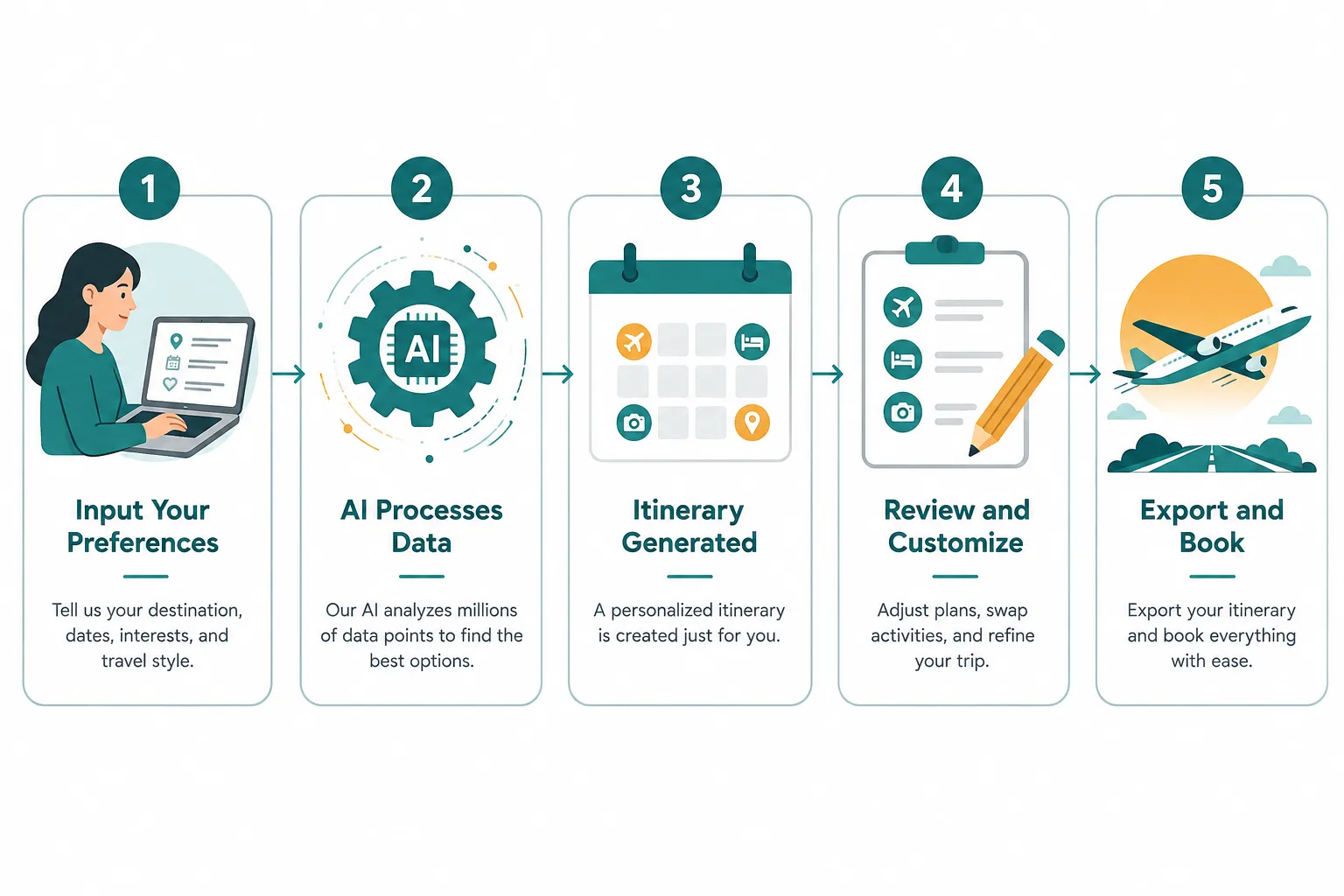
The underlying process works in three stages:
- Input parsing: The AI reads your prompt and extracts key variables (destination, duration, budget range, interests, travel style).
- Pattern generation: The model draws on its training data, which includes travel guides, review platforms, and geographic data, to assemble a logical sequence of activities.
- Output formatting: The AI structures the result as a day-by-day itinerary, often with time slots, transport notes, and brief descriptions of each stop.
Most free AI trip planners do not connect to live databases. This means they cannot check real-time hotel availability or current flight prices. What they do exceptionally well is synthesize large amounts of destination knowledge into a coherent, personalized plan far faster than manual research.
Common mistake: Treating the AI’s output as a confirmed booking. It is a research and planning framework, not a reservation system.
Best Free AI Trip Planner Tools in 2026
Several strong free options exist for travelers who want to design a 7-day vacation without paying for a premium subscription.
| Tool | Free Tier Available | Best For | Key Limitation on Free Plan |
|---|---|---|---|
| ChatGPT (GPT-4o) | Yes | Detailed, conversational planning | Usage limits per session |
| Google Gemini | Yes | Google Maps integration, live search | Less granular day-by-day control |
| Perplexity AI | Yes | Source-cited research and planning | Limited follow-up depth |
| Wanderlog | Yes (free plan) | Visual map-based itinerary building | Collaboration features paywalled |
| Itinerary AI | Yes (limited credits) | Quick structured output | Credits expire; limited customization |
Choose ChatGPT or Gemini if you want conversational back-and-forth refinement. Choose Wanderlog if you prefer a visual, map-based layout you can share with travel companions. Choose Perplexity if you want cited sources alongside your itinerary suggestions.
Can You Really Plan a Whole Vacation for Free with AI
Yes, a complete 7-day vacation plan is achievable at zero cost using free AI tools. The plan will cover daily activities, suggested accommodations by neighborhood, transport options, and restaurant ideas. What it will not do on a free tier is book anything or pull live prices.
The realistic scope of a free AI-generated vacation plan includes:
- A day-by-day activity schedule with approximate timing
- Neighborhood or area recommendations for accommodation
- Suggested transport modes between locations (train, bus, car rental)
- Dining options filtered by cuisine type or dietary need
- Estimated budget ranges based on general destination knowledge (not live data)
- Packing tips and visa or entry requirement reminders
The gap between a free plan and a paid travel agent’s service is primarily in real-time data and human judgment. An AI will not know that a specific museum is closed for renovation this month unless it has been updated with that information. Cross-referencing with the destination’s official tourism website closes most of that gap.
“The output quality of a free AI itinerary depends almost entirely on the quality of the prompt. A detailed 150-word prompt will outperform a 10-word one every time.”
What Should I Input Into an AI Trip Planner to Get Good Results
The single most important factor in getting a useful AI itinerary is the quality of your input. Vague prompts produce generic results. Specific prompts produce plans that feel tailored.
What details should you tell the AI about your budget and preferences:
Include all of the following in your initial prompt:
- Destination and dates: “7 days in Lisbon, Portugal, arriving September 14, 2026”
- Budget range: “Mid-range budget, roughly 100 to 150 USD per day for accommodation and food combined”
- Travel party: “Solo traveler, female, 34 years old” or “Family of four including two children aged 7 and 10”
- Interests: “History, street food, architecture, and one day trip outside the city”
- Pace preference: “Relaxed pace, no more than two major attractions per day”
- Dietary restrictions or accessibility needs: “Vegetarian, no shellfish” or “Traveling with a wheelchair user”
- Accommodation style: “Boutique hotel or well-reviewed guesthouse, central location”
- What to avoid: “No beach clubs, no nightlife-heavy areas”
A prompt that includes all of these elements will return a plan that requires minimal editing. One that says only “Plan a 7-day trip to Portugal” will return something generic that needs significant revision.
How Accurate Are AI Trip Planners Compared to Travel Agents
AI trip planners are highly accurate for destination knowledge, logical routing, and activity sequencing. They are less reliable for real-time data, niche local knowledge, and crisis management. Travel agents hold an advantage in live pricing, personal relationships with hotels, and the ability to intervene when things go wrong.
Where AI performs well:
- Geographic logic (grouping nearby attractions on the same day)
- Cultural context and local customs
- Broad accommodation and dining categories
- Estimating travel time between locations
- Handling standard special requests
Where travel agents still lead:
- Real-time availability and pricing
- Negotiated rates with hotels and tour operators
- Emergency rebooking during disruptions
- Highly niche or luxury experiences
- Complex multi-country visa logistics
For a standard 7-day leisure trip to a well-documented destination, a free AI plan cross-checked against current reviews is comparable in practical quality to a basic travel agent consultation. The difference narrows further when the traveler is willing to spend 30 to 60 minutes verifying key details.
AI Trip Planner vs Travel Booking Sites: Which Is Better
AI trip planners and travel booking sites serve different functions. Booking sites (Booking.com, Expedia, Google Flights) are transactional: they show live inventory and prices. AI trip planners are strategic: they help you decide what to do, where to stay, and how to structure your time. The most effective approach uses both.
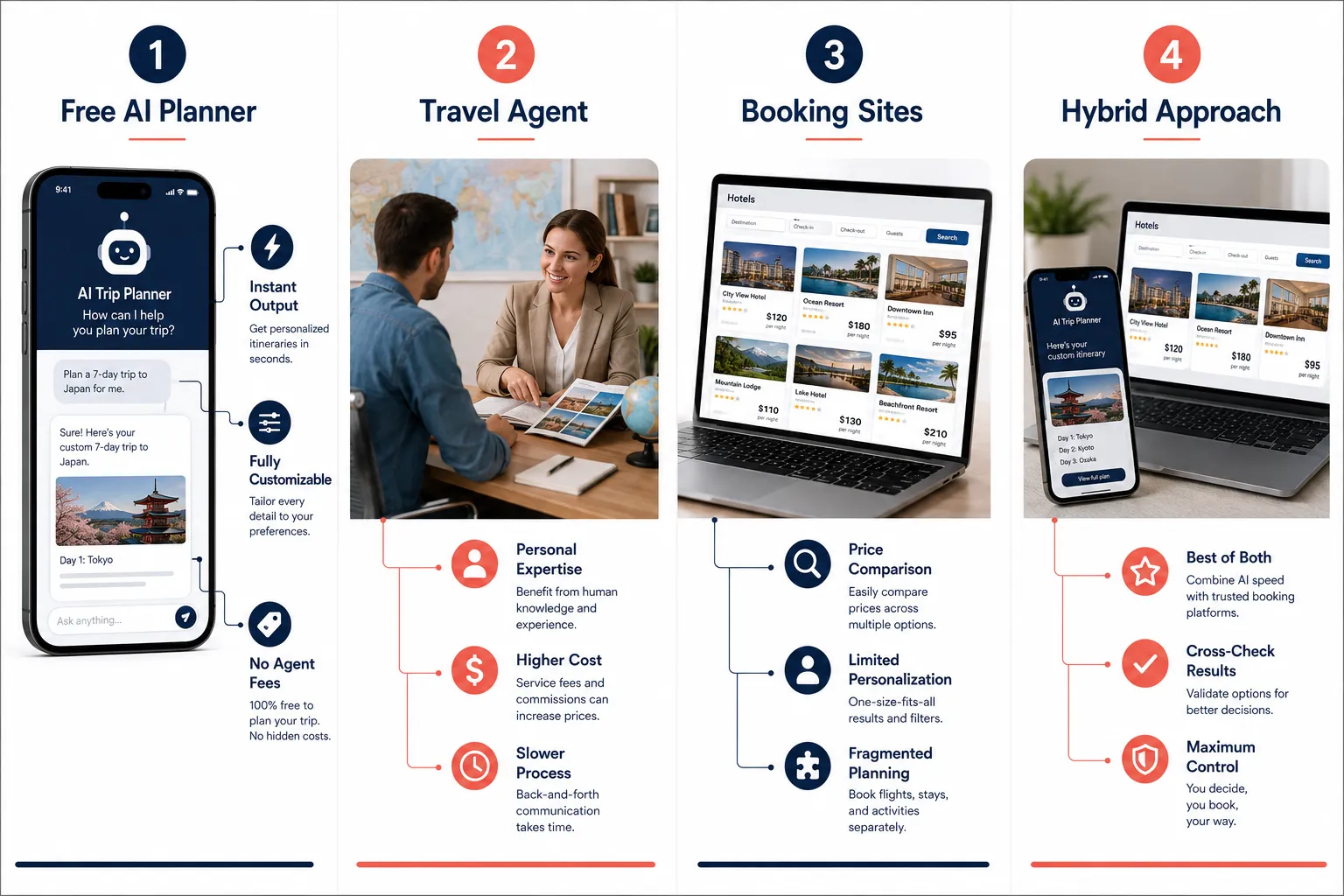
Recommended workflow:
- Use a free AI planner to generate your 7-day itinerary framework.
- Use Google Flights or Skyscanner to find and book flights.
- Use Booking.com or Airbnb to confirm accommodation in the neighborhoods the AI recommended.
- Use Google Maps to verify travel times between the AI’s suggested locations.
- Use TripAdvisor or recent Reddit threads to confirm that specific venues are still operating and well-reviewed.
This hybrid approach takes the strategic thinking burden off the traveler while keeping the transactional accuracy of live booking platforms. It is the most practical way to learn how to use AI trip planners to design a 7-day vacation for free without sacrificing reliability.
For travelers planning budget-intensive road trips, checking detailed cost breakdowns like the Albania 7-Day Road Trip Cost: Full Budget Guide 2026 alongside your AI itinerary helps ground the AI’s general estimates in real numbers.
Do Free AI Trip Planners Have Hidden Costs or Limitations
Free AI trip planners do not have hidden monetary costs, but they do have functional limitations that matter in practice.
Real limitations of free tiers:
- No live pricing: Budget estimates are based on historical averages, not current market rates.
- No booking integration: You must manually visit booking platforms to confirm and reserve.
- Knowledge cutoff dates: Some AI models have training data that ends months or years before your trip. Newly opened venues, closed restaurants, or changed transport routes may not appear.
- Credit or session limits: Tools like Itinerary AI cap the number of free itineraries per month. ChatGPT’s free tier limits message volume during peak usage.
- No real-time alerts: The AI cannot notify you of flight changes, weather disruptions, or local events that conflict with your plan.
What free tiers do well enough for most travelers:
- Full 7-day itinerary generation
- Dietary and accessibility customization
- Multiple destination options within a region
- Budget tier filtering (budget, mid-range, luxury)
- Packing list and cultural tip generation
The limitations are manageable for independent travelers comfortable doing their own bookings. They become more significant for complex itineraries involving multiple countries, unusual destinations, or travelers with high support needs.
How to Avoid Common Mistakes When Using AI for Vacation Planning
The most common mistakes when using AI trip planners fall into three categories: over-trusting the output, under-specifying the prompt, and skipping verification.
Mistake 1: Accepting the first output without refinement
AI itineraries improve dramatically through follow-up prompts. After the first output, ask: “Can you adjust Day 3 to include more time near the waterfront?” or “Replace the museum on Day 5 with an outdoor activity.” Treat the first draft as a starting point, not a final plan.
Mistake 2: Ignoring the knowledge cutoff
Always check that key venues (restaurants, museums, tour operators) are still open. A quick Google search for each major stop takes five minutes and prevents significant disappointment.
Mistake 3: Not specifying budget clearly
“Budget trip” means different things in Tokyo versus Tbilisi. State a specific daily spend range in USD or local currency so the AI calibrates its recommendations appropriately.
Mistake 4: Overpacking the itinerary
AI planners, when not instructed otherwise, tend to suggest ambitious schedules. Add “relaxed pace” or “maximum two major activities per day” to your prompt to get a realistic plan.
Mistake 5: Forgetting connectivity and logistics
If you’re traveling internationally, planning for a local SIM or eSIM is essential for navigating AI-generated itineraries on the go. Resources like Best eSIM Cards for Oman Travel: 2026 Price Comparison show how to research connectivity options for specific destinations before departure.
Can AI Trip Planners Handle Special Requests Like Dietary Restrictions
Yes, free AI trip planners handle special requests well, including dietary restrictions, accessibility requirements, religious observances, and budget constraints. This is one of the strongest practical advantages of AI planning over generic guidebooks.
Dietary restrictions the AI handles reliably:
- Vegetarian and vegan diets
- Gluten-free requirements
- Halal and kosher requirements
- Common allergens (nuts, shellfish, dairy)
How to phrase it: Include the restriction directly in your initial prompt: “All restaurant suggestions must be vegetarian-friendly, ideally with vegan options.” The AI will filter its recommendations accordingly and often note which neighborhoods or markets are most suitable for that diet.
Accessibility needs: Specify mobility requirements, and the AI will prioritize flat routes, accessible transport, and accommodation with elevator access. It will not guarantee compliance with local accessibility standards, so verifying with hotels and venues directly remains important.
What if the AI suggests places you don’t want to visit: Simply tell it. Follow-up prompts like “Remove all beach-related activities and replace with cultural or food experiences” work immediately. The AI has no attachment to its initial suggestions and will revise without friction.
Is AI Trip Planning Good for Solo Travel or Group Vacations
AI trip planning works well for both solo and group travel, but the approach differs slightly for each.
Solo travelers benefit most from AI planning because the itinerary only needs to satisfy one person’s preferences. The AI can optimize for safety (well-lit neighborhoods, reputable hostels), budget efficiency, and solo-friendly activities like walking tours, cooking classes, and day trips with group operators.
Group travelers should input each person’s key preferences and any non-negotiables into the prompt. For example: “Group of six adults, ages 28 to 45. Two are vegetarian. One person wants at least one adventure activity. Two others prefer cultural and historical sites. Budget is mid-range.” The AI will attempt to balance these, though some manual negotiation among the group will still be needed.
Families with children: Specify ages. The AI adjusts activity intensity, pacing, and venue types based on child age ranges. A family with toddlers gets different suggestions than one with teenagers.
For travelers exploring budget-friendly regional destinations, pairing AI planning with destination-specific cost research, such as the Cheapest Ways to Travel Around Kyushu Japan in 2026, helps validate the AI’s transport and accommodation suggestions against real traveler experience.
How Long Does It Take an AI to Plan a 7-Day Trip
An AI trip planner generates a complete 7-day itinerary in 10 to 60 seconds, depending on the tool and server load. The user’s total time investment, including prompt writing, reviewing the output, and running follow-up refinements, is typically 15 to 45 minutes for a well-structured plan.
Time breakdown for a realistic free AI planning session:
- Writing a detailed initial prompt: 5 to 10 minutes
- First itinerary generation: under 1 minute
- Reviewing and running 2 to 3 refinement prompts: 10 to 15 minutes
- Cross-checking key venues and transport times: 20 to 30 minutes
- Total: approximately 40 to 60 minutes for a verified, usable 7-day plan
Compare this to traditional research methods. Building a comparable itinerary manually from guidebooks, travel blogs, and booking sites typically takes 8 to 15 hours spread across multiple sessions. The time saving is the most tangible practical benefit of learning how to use AI trip planners to design a 7-day vacation for free.
Should I Use an AI Trip Planner for Adventure Travel or Just Relaxation Trips
AI trip planners handle both adventure and relaxation itineraries well. The type of trip does not limit the AI’s usefulness, but adventure travel requires more post-generation verification.
For relaxation trips (beach holidays, city breaks, wellness retreats): AI output is highly reliable. Accommodation, dining, and low-intensity activity suggestions are well within the AI’s knowledge base and rarely require significant correction.
For adventure travel (trekking, multi-day hikes, water sports, expedition-style trips): The AI can suggest routes, operators, and logistics, but safety-critical details must be independently verified. Permit requirements, seasonal trail conditions, operator licensing, and emergency protocols are not reliably current in AI training data.
Practical rule: Use the AI to build the framework and identify options, then verify every safety-relevant detail with official sources (national park websites, local tourism boards, licensed operator websites).
For travelers exploring regional destinations with complex transport logistics, AI planning pairs well with granular local guides. The RoamBudget blog covers destination-specific budget and logistics breakdowns that complement AI-generated itineraries with ground-level accuracy.
A Step-by-Step Guide: How to Use AI Trip Planners to Design a 7-Day Vacation for Free
This is the practical process for getting a complete, usable 7-day itinerary from a free AI tool.
Step 1: Choose your tool
Open ChatGPT (free tier), Google Gemini, or Perplexity AI. No account is required for Perplexity; the others require a free sign-up.
Step 2: Write a detailed prompt
Include destination, dates, budget range, party size and ages, interests, pace preference, dietary needs, and anything to avoid. Aim for 100 to 200 words.
Step 3: Review the first output
Read through the full 7-day plan. Note anything that does not fit your preferences, any days that feel overloaded, and any suggestions you want to replace.
Step 4: Refine with follow-up prompts
Ask the AI to adjust specific days, swap activities, add a day trip, or rebalance the pace. Repeat until the structure feels right.
Step 5: Export or copy the itinerary
Copy the final plan into a notes app, Google Doc, or Wanderlog (free plan) for easy access during travel.
Step 6: Verify key details
Check that major venues are open, confirm transport options on Google Maps, and read recent reviews for accommodation and restaurant suggestions.
Step 7: Book independently
Use Google Flights, Booking.com, or local booking platforms to confirm and pay for flights and accommodation based on the AI’s recommendations.
This seven-step process is the core of how to use AI trip planners to design a 7-day vacation for free without spending money on planning tools or travel agents.
FAQ
Can I use a free AI trip planner without creating an account?
Yes. Perplexity AI requires no account. Google Gemini and ChatGPT offer free access with a basic account sign-up, which costs nothing.
Will the AI book my flights and hotels automatically?
No. Free AI trip planners generate recommendations and itineraries but do not connect to booking systems. You book separately through flight and accommodation platforms.
How current is the information in a free AI trip planner?
It depends on the tool’s training cutoff. ChatGPT’s knowledge base is updated periodically but may lag by several months to over a year. Perplexity AI uses live web search, making it more current for venue and event information.
Can I use an AI planner for a destination I’ve never researched?
Yes, and this is one of the strongest use cases. The AI can introduce you to neighborhoods, transport systems, and local customs you would not have found through casual browsing.
What if the AI trip planner suggests places I don’t want to visit?
Tell it directly in a follow-up prompt. For example: “Remove the wine tasting on Day 4 and replace it with a half-day hike nearby.” The AI revises immediately without requiring you to start over.
Is AI trip planning safe for international travel?
The planning itself is safe. For international trips, always verify visa requirements, entry rules, and travel advisories through official government sources rather than relying solely on AI output.
Can AI planners suggest free or low-cost activities?
Yes. Specify “prioritize free or low-cost activities” in your prompt, and the AI will emphasize parks, free museum days, public markets, and walking routes.
Do AI trip planners work for last-minute travel?
Yes, and they are particularly useful for last-minute trips where there is no time for extended research. A detailed prompt returns a usable plan in under a minute.
Can I share an AI-generated itinerary with my travel group?
Yes. Copy the output into a shared Google Doc or import it into Wanderlog’s free plan, which supports collaborative editing.
Are there AI trip planners specifically designed for budget travelers?
Wanderlog and TripIt (free tier) are designed with budget tracking in mind. ChatGPT and Gemini can be prompted to focus specifically on budget travel without any special configuration.
How do I handle time zones and long travel days in an AI itinerary?
Include arrival and departure times in your prompt. For example: “Arriving at 9 PM on Day 1, so Day 1 should only include check-in and a nearby dinner.” The AI will adjust the schedule accordingly.
Can the AI account for local holidays or events that might affect my trip?
It can flag major annual events if they fall within its training data, but real-time event calendars are not reliably current. Check the destination’s official tourism website for local holidays and major events during your travel dates.
Conclusion
Learning how to use AI trip planners to design a 7-day vacation for free is a practical skill that saves significant time and produces genuinely useful results. The core process is simple: write a detailed prompt, refine the output through follow-up questions, verify key details independently, and book through standard platforms.
Actionable next steps:
- Open ChatGPT or Google Gemini and write a 150-word prompt for your next destination, including budget, party details, and interests.
- Run two or three refinement prompts until the day-by-day structure matches your travel style.
- Spend 30 minutes cross-checking major venues and transport options on Google Maps and recent traveler reviews.
- Export the final itinerary to a shared document or Wanderlog for easy access during the trip.
- Book flights and accommodation independently using live platforms, using the AI’s neighborhood and timing recommendations as your guide.
Free AI trip planning is not a replacement for all travel expertise, but for the vast majority of 7-day leisure trips, it is more than capable of producing a well-structured, personalized itinerary at no cost. The travelers who get the most from it are those who treat the AI as a knowledgeable starting point rather than a finished product.

